

This is the Experimental version (Latest). It is under active development and may change. For the most reliable documentation, use the version selector in the top-right to switch to Stable, or click here to go to the Stable version's homepage.
DefectDojo Installation
Last updated:
DefectDojo is a Centralised Vulnerability Management
Important Notes
Section titled “Important Notes”- Security Context Configration with Official DefectDojo Helm Chart is not applicatable
- As DefectDojo Container Images are not yet implement run as non-root user and requires Run as Root/Run with Privilege Exceptions.
Prerequisites
Section titled “Prerequisites”Kubernetes Cluster
Section titled “Kubernetes Cluster”DefectDojo will be installed on 🟢 Management Kubernetes Cluster
- 📥Ingress Service provided as Kubernetes Ingress Class (
IngressClass) - 🛡️TLS Certificate for DefectDojo provided as Kubernetes Secret
- DefectDojo will be exposed as HTTPS with Kubernetes Ingress.
Application Dependencies
Section titled “Application Dependencies”DefectDojo depends on multiple dependencies to be up and running but only the following will be provisioned and/or managed by you.
- 📦PostgreSQL SQL Database ; Deploy external/dedicated instance of Database.
- In case will be installed on Kubernetes Cluster.
- Will require 💿Persistence Storage as Kubernetes Storage Class (
StorageClass)
- Will require 💿Persistence Storage as Kubernetes Storage Class (
- In case will be installed on Kubernetes Cluster.
Provisioning Summary
Section titled “Provisioning Summary”Once finished everything, these are systems that up and running.
| No. | Tool | Description | Kubernetes Namespace | Kubernetes Cluster |
|---|---|---|---|---|
| 1. | PostgreSQL for DefectDojo | Database System for DefectDojo | devsecops-system | 🟢 Management |
| 2. | DefectDojo | Centralised Vulnerability Management | devsecops-system | 🟢 Management |
Complete Prerequisites
Section titled “Complete Prerequisites”Kubernetes Cluster
Section titled “Kubernetes Cluster”Prepare Shell Variables
Section titled “Prepare Shell Variables”Ensure you have defined and loaded your Global Shell Variables as described in Shell Variables.
-
Connect to
🟢 ManagementKubernetes Cluster ; i.e w/ Kubeconfig FileEnsure you have defined and loaded your Global Shell Variables as described in Shell Variables.
Terminal window source $BASE_WORKING_DIR/shell-values/kubernetes/management_cluster.vars.sh -
Export Required Shell Variables
Ensure
DEFECTDOJO_DOMAIN,DEFECTDOJO_ADMIN_USERNAME,DEFECTDOJO_ADMIN_PASSWORD, andDEFECTDOJO_ADMIN_EMAILare defined as per the Shell Variables guide.Ensure
K8S_INTERNAL_DOMAIN,K8S_INGRESSCLASS_NAME,K8S_STORAGECLASS_NAME,K8S_INGRESS_TLS_CERTIFICATE_SECRET_NAMEare defined as per the Shell Variables guide.Ensure
KEYCLOAK_DOMAIN,KEYCLOAK_REALMare defined as per the Shell Variables guide. -
Create Kubernetes Secret for 🛡️ TLS Certificate for DefectDojo in Namespace
devsecops-system.Kubernetes Ingress for DefectDojo will associate TLS Certificate with Kubernetes Secret named
$K8S_INGRESS_TLS_CERTIFICATE_SECRET_NAME.Create one using from
.crtand.keyfile.Terminal window kubectl create secret tls $K8S_INGRESS_TLS_CERTIFICATE_SECRET_NAME \--cert=/path/to/cert/file --key=/path/to/key/file \--namespace devsecops-system💡 Should return
secret/... createdmessage.
Application Dependencies
Section titled “Application Dependencies”PostgreSQL SQL Database
Section titled “PostgreSQL SQL Database”-
Set PostgreSQL Information
- Database Name:
defectdojo(Defined in manifest) - Database User:
defectdojo(Defined in manifest) - Database Password:
${DEFECTDOJO_POSTGRES_USER_PASSWORD}(Previously exported) - Postgres Superuser Password:
${DEFECTDOJO_POSTGRES_SUPERUSER_PASSWORD}(Previously exported)
- Database Name:
-
Provision PostgreSQL for DefectDojo
The following manifest defines the entire PostgreSQL system, including credentials and the CNPG cluster.
Terminal window cat <<EOF > $BASE_WORKING_DIR/kubernetes-manifests/defectdojo-postgres.yaml---# DefectDojo Postgres Superuser CredentialsapiVersion: v1kind: Secrettype: kubernetes.io/basic-authmetadata:name: defectdojo-postgres-superusernamespace: devsecops-systemstringData:username: postgrespassword: "${DEFECTDOJO_POSTGRES_SUPERUSER_PASSWORD}"---# DefectDojo Application User CredentialsapiVersion: v1kind: Secrettype: kubernetes.io/basic-authmetadata:name: defectdojo-postgres-usernamespace: devsecops-systemstringData:username: defectdojopassword: "${DEFECTDOJO_POSTGRES_USER_PASSWORD}"---# S3 Credentials for Postgres Backups (to SeaweedFS HA)apiVersion: v1kind: Secrettype: Opaquemetadata:name: defectdojo-postgres-s3-secretnamespace: devsecops-systemstringData:S3_ACCESS_KEY: "postgres-backup"S3_SECRET_KEY: "${SEAWEEDFS_HA_S3_POSTGRES_BACKUP_PASSWORD}"---apiVersion: barmancloud.cnpg.io/v1kind: ObjectStoremetadata:name: defectdojo-postgres-backupnamespace: devsecops-systemspec:# This resource defines the backup destination for the Barman Cloud Pluginconfiguration:destinationPath: s3://postgres-backups/endpointURL: "http://${SEAWEEDFS_HA_API_INTERNAL_DOMAIN}"s3Credentials:accessKeyId:name: defectdojo-postgres-s3-secretkey: S3_ACCESS_KEYsecretAccessKey:name: defectdojo-postgres-s3-secretkey: S3_SECRET_KEYwal:compression: gzipdata:compression: gzip# Retention policy for backups and WALs handled by the pluginretentionPolicy: "30d"---apiVersion: postgresql.cnpg.io/v1kind: Clustermetadata:name: defectdojo-postgresnamespace: devsecops-systemlabels:app.kubernetes.io/name: defectdojo-postgresapp.kubernetes.io/part-of: defectdojospec:instances: 1# Image configuration (Postgres 15)imageName: ghcr.io/cloudnative-pg/postgresql:15# Enable the Barman Cloud Plugin for backupsplugins:- name: barman-cloud.cloudnative-pg.ioisWALArchiver: trueparameters:serverName: "defectdojo-postgres"barmanObjectName: "defectdojo-postgres-backup"# Storage Configurationstorage:size: 5GistorageClass: "${K8S_STORAGECLASS_NAME}"walStorage:size: 2GistorageClass: "${K8S_STORAGECLASS_NAME}"# Bootstrap Configurationbootstrap:initdb:database: defectdojoowner: defectdojosecret:name: defectdojo-postgres-user# Superuser credentials (root/postgres)superuserSecret:name: defectdojo-postgres-superuser# Backup Configuration (Barman Cloud Plugin will automatically detect matching ObjectStore)backup:{}# Resourcesresources:requests:memory: "256Mi"cpu: "200m"limits:memory: "1Gi"cpu: "1000m"EOFTerminal window kubectl apply -f $BASE_WORKING_DIR/kubernetes-manifests/defectdojo-postgres.yaml -
Check for PostgreSQL for DefectDojo Readiness - MUST be Ready and Running.
Get Pod Status - PostgreSQL for DefectDojo
Terminal window kubectl get pods -n devsecops-system💡 PostgreSQL for DefectDojo Pods MUST be
RunningNAME READY STATUS RESTARTS AGE... (deducted)defectdojo-postgres-1 2/2 Running 0 XdXh
Pre-Installation
Section titled “Pre-Installation”Prepare DefectDojo Configurations
Section titled “Prepare DefectDojo Configurations”-
DefectDojo Entrypoint Domain
- Domain:
${DEFECTDOJO_DOMAIN}(Previously exported)
- Domain:
-
DefectDojo Initial Admin Account
- Admin Username:
${DEFECTDOJO_ADMIN_USERNAME}(Previously exported) - Admin Password:
${DEFECTDOJO_ADMIN_PASSWORD}(Previously exported) - Admin Email:
${DEFECTDOJO_ADMIN_EMAIL}(Previously exported)
- Admin Username:
-
Configure OIDC with Keycloak
Ensure you have followed the Procuring Keycloak Credentials guide to obtain the
client-id,client-secret, andsigning-public-keyfor DefectDojo.Terminal window cat <<EOF > $BASE_WORKING_DIR/kubernetes-manifests/defectdojo-oidc.yamlapiVersion: v1kind: Secrettype: Opaquemetadata:name: defectdojo-oidc-configurationsstringData:client-id: ${DEFECTDOJO_OIDC_CLIENT_ID}client-secret: ${DEFECTDOJO_OIDC_CLIENT_SECRET}authorization-endpoint: https://${KEYCLOAK_DOMAIN}/realms/${KEYCLOAK_REALM}/protocol/openid-connect/authaccess-token-endpoint: https://${KEYCLOAK_DOMAIN}/realms/${KEYCLOAK_REALM}/protocol/openid-connect/tokensigning-public-key: ${KEYCLOAK_SIGNING_PUBKEY}EOFApply the OIDC configuration:
Terminal window kubectl apply --namespace devsecops-system \-f $BASE_WORKING_DIR/kubernetes-manifests/defectdojo-oidc.yaml -
Create Helm Values Configurations
Terminal window cat <<EOF > $BASE_WORKING_DIR/helm-values/defectdojo-full-values.yaml---## Application: Exposed Hostname (Ingress)host: "${DEFECTDOJO_DOMAIN}"site_url: "https://${DEFECTDOJO_DOMAIN}"## Application: Configure RabbitMQ## NOTE: Community Deprecate RabbitMQ on 2024-Q1 Updates, move to Redis; Retain for Older Helm Chart Version DefectDojo Deployment, Can be removed later## See On: https://github.com/DefectDojo/django-DefectDojo/discussions/9690createRabbitMqSecret: truerabbitmq:ulimitNofiles: "" ## OPSTELLA_CUSTOMIZE: Eliminate ulimit ProblemclusterDomain: "${K8S_INTERNAL_DOMAIN}"## Application: Configure RediscreateRedisSecret: trueredis:image:repository: bitnamilegacy/redisclusterDomain: "${K8S_INTERNAL_DOMAIN}"master:persistence:storageClass: "${K8S_STORAGECLASS_NAME}"## Kubernetes/Application: AuthenticationcreateSecret: trueadmin:user: adminpassword: "${DEFECTDOJO_ADMIN_PASSWORD}"mail: "${DEFECTDOJO_ADMIN_EMAIL}"firstName: DefectdojolastName: Administrator## Application: Application Initializer ; For first time ONLYinitializer:## should be false after initial installation was performedrun: truesecurityContext:enabled: truedjangoSecurityContext:# django dockerfile sets USER=1001runAsUser: 1001runAsNonRoot: trueseccompProfile:type: RuntimeDefaultprivileged: falseallowPrivilegeEscalation: falsecapabilities:drop: ["ALL"]nginxSecurityContext:# nginx dockerfile sets USER=1001runAsUser: 1001runAsNonRoot: trueseccompProfile:type: RuntimeDefaultprivileged: falseallowPrivilegeEscalation: falsecapabilities:drop: ["ALL"]django:## Kubernetes: Expose through Kubernetes Ingressingress:enabled: trueingressClassName: "${K8S_INGRESSCLASS_NAME}"annotations:nginx.ingress.kubernetes.io/proxy-body-size: "0"ingress.kubernetes.io/proxy-body-size: "0"## OPSTELLA_CUSTOMIZE: Fix Heavy DefectDojo Finding Uploads Failed Due to Timeoutnginx.ingress.kubernetes.io/proxy-read-timeout: "1800"activateTLS: truesecretName: "${K8S_INGRESS_TLS_CERTIFICATE_SECRET_NAME}"## Kubernetes/Application: Database Configurationdatabase: postgresqlcreatePostgresqlSecret: falsepostgresql:enabled: falsepostgresServer: defectdojo-postgres-rw.devsecops-system.svcauth:database: defectdojousername: defectdojoexistingSecret: defectdojo-postgres-usersecretKeys:adminPasswordKey: usernameuserPasswordKey: password## OPSTELLA_CUSTOMIZE/Application: Extra Configurations:## - OIDC with KeycloakextraConfigs:DD_SECURE_SSL_REDIRECT: 'True'DD_SOCIAL_AUTH_KEYCLOAK_OAUTH2_ENABLED: 'True'DD_SOCIAL_AUTH_KEYCLOAK_LOGIN_BUTTON_TEXT: "Sign in with Opstella"## OPSTELLA_CUSTOMIZE/Kubernetes/Application: Extra Environment Variables:## - OIDC with Keycloak: Related Values for SetupextraEnv:- name: DD_SOCIAL_AUTH_KEYCLOAK_PUBLIC_KEYvalueFrom:secretKeyRef:name: defectdojo-oidc-configurationskey: signing-public-key- name: DD_SOCIAL_AUTH_KEYCLOAK_AUTHORIZATION_URLvalueFrom:secretKeyRef:name: defectdojo-oidc-configurationskey: authorization-endpoint- name: DD_SOCIAL_AUTH_KEYCLOAK_ACCESS_TOKEN_URLvalueFrom:secretKeyRef:name: defectdojo-oidc-configurationskey: access-token-endpoint- name: DD_SOCIAL_AUTH_KEYCLOAK_KEYvalueFrom:secretKeyRef:name: defectdojo-oidc-configurationskey: client-id- name: DD_SOCIAL_AUTH_KEYCLOAK_SECRETvalueFrom:secretKeyRef:name: defectdojo-oidc-configurationskey: client-secretEOF
Installation
Section titled “Installation”-
Add DefectDojo Helm Repository
Terminal window helm repo add defectdojo https://raw.githubusercontent.com/DefectDojo/django-DefectDojo/helm-chartshelm repo update -
Install DefectDojo
-
Install a Helm Release with specific Helm Chart Version
--version 1.6.179(App Version: 2.44.3)Terminal window helm upgrade --install defectdojo defectdojo/defectdojo --version 1.6.179 \--namespace devsecops-system \--set initializer.run=true \-f $BASE_WORKING_DIR/helm-values/defectdojo-full-values.yaml
-
Post-Installation
Section titled “Post-Installation”DefectDojo Testing
Section titled “DefectDojo Testing”-
Get Pod Status - DefectDojo
Terminal window kubectl get pods -n devsecops-systemDefectDojo Pods should be
RunningNAME READY STATUS RESTARTS AGE... (deducted)defectdojo-celery-beat-XXXXX-YYYY 1/1 Running 0 XdXhdefectdojo-celery-worker-XXXXX-YYYY 1/1 Running 0 XdXhdefectdojo-django-XXXXX-YYYY 2/2 Running 0 XdXhdefectdojo-redis-master-0 1/1 Running 0 XdXh -
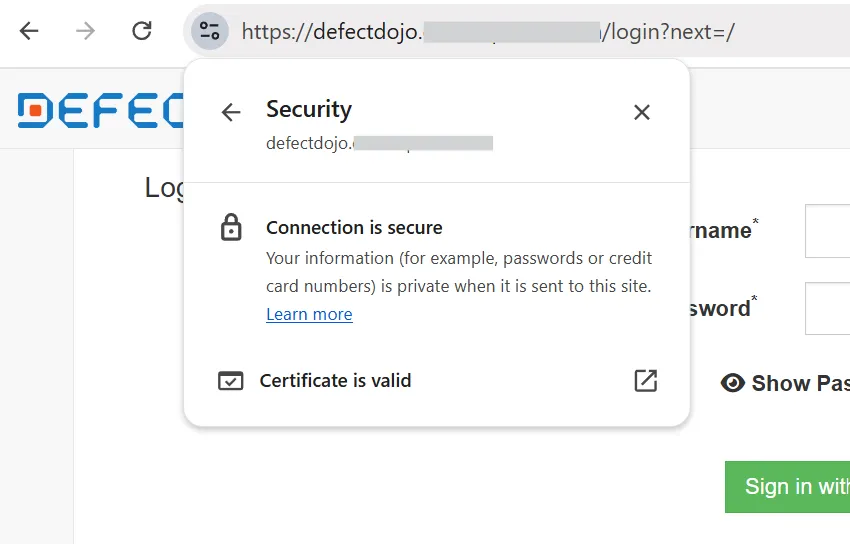
Visit
https://${DEFECTDOJO_DOMAIN}- It should be accessible.
- TLS Certificate should be valid and coresponding to your TLS Certificate Installed
-
Login with Users
-
Try to login with Initial Admin Account
defectdojo,$DEFECTDOJO_ADMIN_PASSWORD, if success then it works. -
You will be testing Single Sign-On Integration in End-to-End Testing/Single Sign-On for DefectDojo
-
Retrieve Access Token
Section titled “Retrieve Access Token”Will be used for Integrating with Opstella
-
Login with Initial Admin Account
- Username:
defectdojo - Password:
$DEFECTDOJO_ADMIN_PASSWORD
- Username:
-
Go to Top Right User Menu >
API v2 Key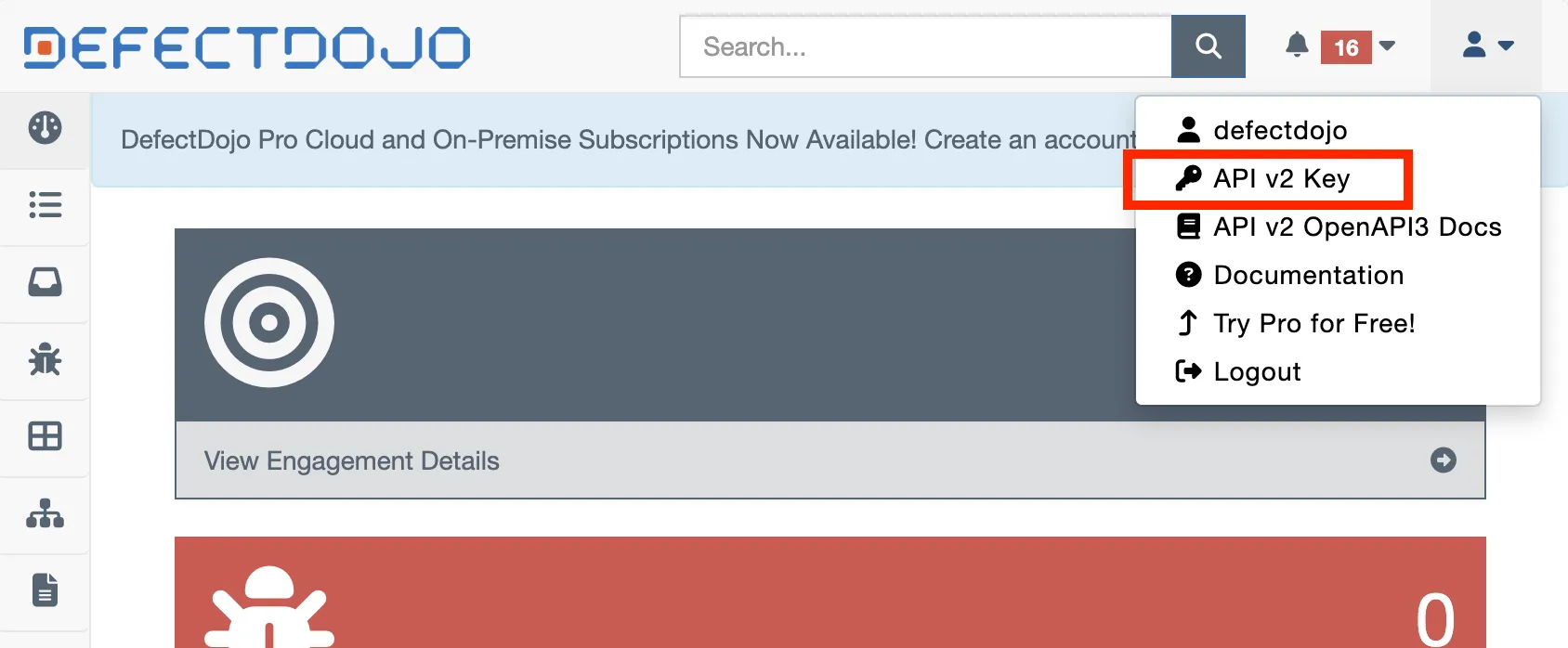
-
Save the one starts with
Token abc123...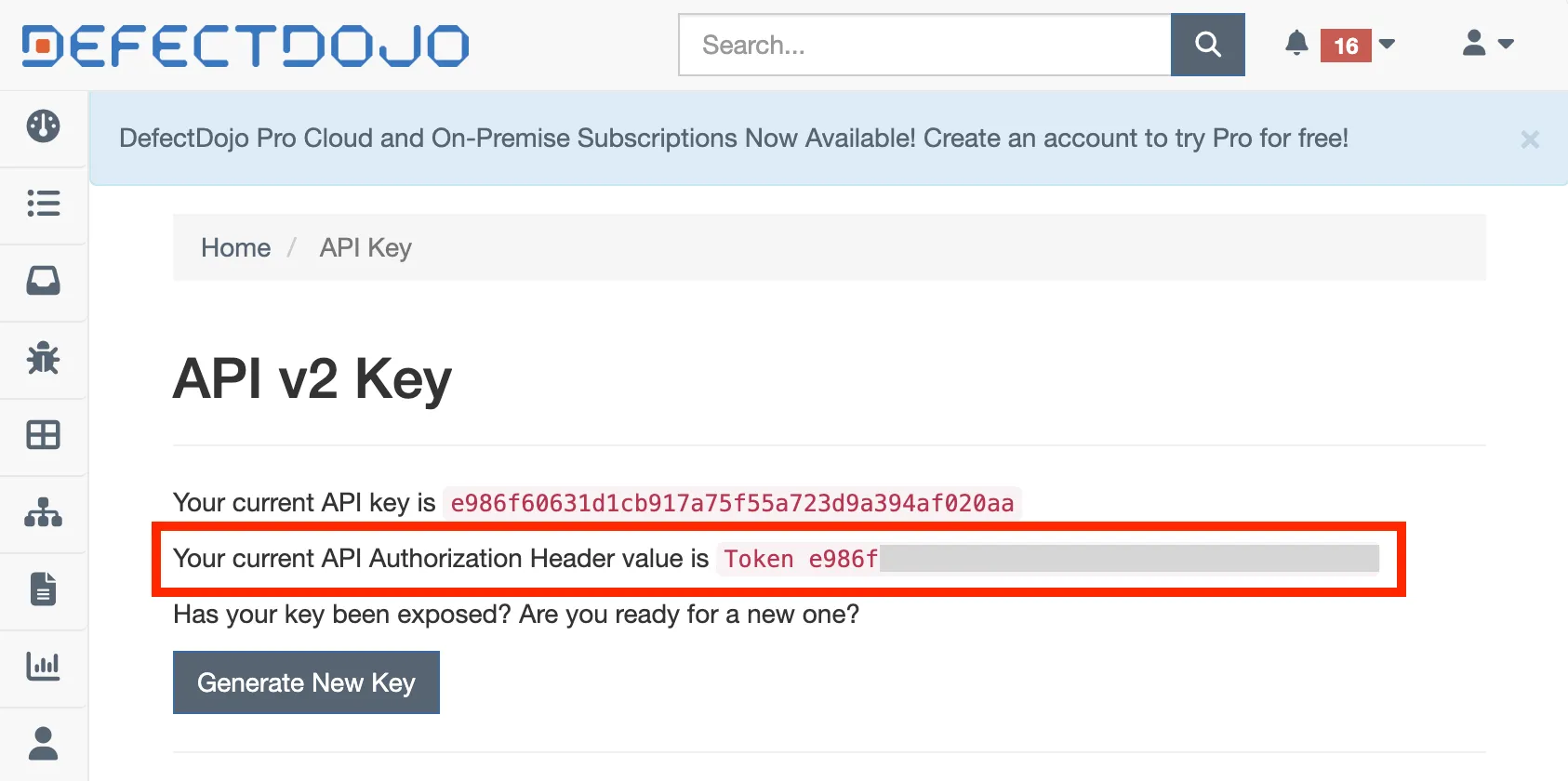
-
Save to Shell variables for future use
$BASE_WORKING_DIR/shell-values/tools/defectdojo.vars.shwithDEFECTDOJO_TOKENvariable name
Troubleshooting
Section titled “Troubleshooting”defectdojo-celery-beat stuck in CrashLoopBackOff and never recovers
Section titled “defectdojo-celery-beat stuck in CrashLoopBackOff and never recovers”Symptom — defectdojo-celery-beat is 0/1 CrashLoopBackOff with a very high RESTARTS count, while every other DefectDojo Pod is Running. The Helm Release still reports deployed.
kubectl logs -n devsecops-system -l defectdojo.org/component=celery,defectdojo.org/subcomponent=beatERROR: Pidfile (/var/run/defectdojo/celery-beat.pid) already exists.Seems we're already running? (pid: 1)Cause — The Helm Chart mounts an emptyDir Volume at /run/defectdojo (/var/run is a symlink to /run), and Celery Beat writes its pidfile there. An emptyDir lives for the lifetime of the Pod, not the Container. If Celery Beat is ever killed uncleanly (OOM, Node pressure, SIGKILL, an API Server outage), the pidfile is left behind, and every Container restart inside the same Pod reads the stale pidfile, assumes another Beat is already running, and exits with code 73. The restart loop can never clear itself.
Fix — Delete the Pod, so its emptyDir is discarded with it. Restarting the Container, or kubectl rollout restart, is not enough.
kubectl delete pod -n devsecops-system -l defectdojo.org/component=celery,defectdojo.org/subcomponent=beat💡 The new Pod should reach 1/1 Running, with beat: Starting... in its Logs.
Finished?
Use the below navigation to proceed