

This is the Experimental version (Latest). It is under active development and may change. For the most reliable documentation, use the version selector in the top-right to switch to Stable, or click here to go to the Stable version's homepage.
ArgoCD Non-Production Environment Installation
อัพเดทล่าสุด:
เนื้อหานี้ยังไม่มีในภาษาของคุณ
Prerequisites
Section titled “Prerequisites”Kubernetes Cluster
Section titled “Kubernetes Cluster”ArgoCD (Non-Production) will be installed on 🟦 Non-Production Workload Kubernetes Cluster
- 📥Ingress Service provided as Kubernetes Ingress Class (
IngressClass) - 🛡️TLS Certificate for ArgoCD (Non-Production) provided as Kubernetes Secret
- ArgoCD (Non-Production) will be exposed as HTTPS with Kubernetes Ingress.
Application Dependencies
Section titled “Application Dependencies”To Setup Single Sign-On with Opstella (MUST be performed at the time of installation), you need
- 📦Opstella Keycloak
- Your dedicated Keycloak Realm.
foobar-opstella; Please change accordingly
- Your dedicated Keycloak Realm.
- 🔑OpenID Connect Credentials: Client ID, Client Secret.
- Gather Client ID, Client Secret - from Procuring Keycloak Credentials
Complete Prerequisites
Section titled “Complete Prerequisites”Kubernetes Cluster
Section titled “Kubernetes Cluster”Prepare Shell Variables
Section titled “Prepare Shell Variables”Ensure you have defined and loaded your Global Shell Variables as described in Shell Variables.
-
Connect to
🟦 Non-Production WorkloadKubernetes Cluster ; i.e w/ Kubeconfig FileEnsure you have defined and loaded your Global Shell Variables as described in Shell Variables.
Terminal window source $BASE_WORKING_DIR/shell-values/kubernetes/nonprod_cluster.vars.sh -
Export Required Shell Variables
Section titled “Export Required Shell Variables”Export these variables in your terminal before proceeding with the installation.
Ensure
ARGOCD_DOMAIN,K8S_INTERNAL_DOMAIN,K8S_INGRESSCLASS_NAME,K8S_STORAGECLASS_NAME,K8S_INGRESS_TLS_CERTIFICATE_SECRET_NAME, and OIDC credentials are defined as per the Shell Variables guide and your tool variables. -
Create Kubernetes Secret for 🛡️ TLS Certificate for ArgoCD (Non-Production) in Namespace
devsecops-system.Create one using from
.crtand.keyfile.Terminal window kubectl create secret tls $K8S_INGRESS_TLS_CERTIFICATE_SECRET_NAME \--cert=/path/to/cert/file --key=/path/to/key/file \--namespace devsecops-system💡 Should return
secret/wildcard-${BASE_DOMAIN}-tls createdmessage.
Pre-Installation
Section titled “Pre-Installation”Prepare ArgoCD (Non-Production) Configurations
Section titled “Prepare ArgoCD (Non-Production) Configurations”-
Specify OIDC Authentication Information
Using Opstella Keycloak Information
-
OIDC Issuer Endpoint from Opstella Keycloak Information
(Ensure the OIDC Issuer Endpoint is loaded from your variables)
-
-
Create Helm Values Configurations
Terminal window cat <<EOF > $BASE_WORKING_DIR/helm-values/argocd-nonprod-full-values.yaml## Serverserver:ingress:# -- Enable an ingress resource for the Argo CD serverenabled: true# -- Defines which ingress controller will implement the resourceingressClassName: ${K8S_INGRESSCLASS_NAME}# -- List of ingress hosts## Argo Ingress.## Hostnames must be provided if Ingress is enabled.## Secrets must be manually created in the namespacehostname: ${ARGOCD_DOMAIN}# -- List of ingress pathspaths:- /# -- Ingress path type. One of Exact, Prefix or ImplementationSpecificpathType: PrefixextraTls:- secretName: ${K8S_INGRESS_TLS_CERTIFICATE_SECRET_NAME}hosts:- ${ARGOCD_DOMAIN}configs:params:# -- Run argocd-server without its own TLS. Keep this `true`.# TLS is terminated at the Ingress with ${K8S_INGRESS_TLS_CERTIFICATE_SECRET_NAME}. Setting it# back to `false` makes argocd-server serve TLS and redirect HTTP to HTTPS behind an Ingress# that already did so, which shows up as a redirect loop in the browser.server.insecure: truecm:url: "https://${ARGOCD_DOMAIN}"oidc.config: |name: Opstellaissuer: "${ARGOCD_OIDC_ISSUER_ENDPOINT}"clientID: "${ARGOCD_OIDC_CLIENT_ID}"clientSecret: "${ARGOCD_OIDC_CLIENT_SECRET}"#Add rootCA if needed#rootCA: |# -----BEGIN CERTIFICATE-----# ... encoded certificate data here ...# -----END CERTIFICATE-----requestedIDTokenClaims:groups:essential: truerequestedScopes:- openid- profile- emailrbac:scopes: "[groups]"EOF
Installation
Section titled “Installation”-
Add ArgoCD Helm Repository
Terminal window # Add Helm Repositoryhelm repo add argo https://argoproj.github.io/argo-helmhelm repo update -
Install a Helm Release with specific Helm Chart Version
--version 7.4.2(App Version: v2.12.0)Terminal window helm upgrade --install argocd-nonprod argo/argo-cd --version 7.4.2 \--namespace devsecops-system \-f $BASE_WORKING_DIR/helm-values/argocd-nonprod-full-values.yaml
Post-Installation
Section titled “Post-Installation”Gather Initial Admin Credentials
Section titled “Gather Initial Admin Credentials”ArgoCD generates a random password for the local admin account at first install and stores it in
the argocd-initial-admin-secret Secret.
kubectl get secret argocd-initial-admin-secret \ --namespace devsecops-system \ -o jsonpath='{.data.password}' | base64 -d; echo- Username is
admin. - Store the password in your password vault before changing it — ArgoCD deletes
argocd-initial-admin-secretas soon as the admin password is changed.
ArgoCD Testing
Section titled “ArgoCD Testing”-
Get Pod Status - ArgoCD
Terminal window kubectl get pods -n devsecops-systemArgoCD should be
RunningNAME READY STATUS RESTARTS AGE... (deducted)argocd-application-controller-0 1/1 Running 0 Xdargocd-applicationset-controller-XXXXXX-YYYYY 1/1 Running 0 Xdargocd-dex-server-b6b8bb9f5-g7n8w 1/1 Running 0 Xdargocd-notifications-controller-XXXXXX-YYYYY 1/1 Running 0 Xdargocd-redis-XXXXXX-YYYYY 1/1 Running 0 Xdargocd-repo-server-XXXXXX-YYYYY 1/1 Running 0 Xdargocd-server-XXXXXX-YYYYY 1/1 Running 0 Xd -
Visit
https://${ARGOCD_DOMAIN}- It should be accessible.
- TLS Certificate should be valid and coresponding to your TLS Certificate Installed
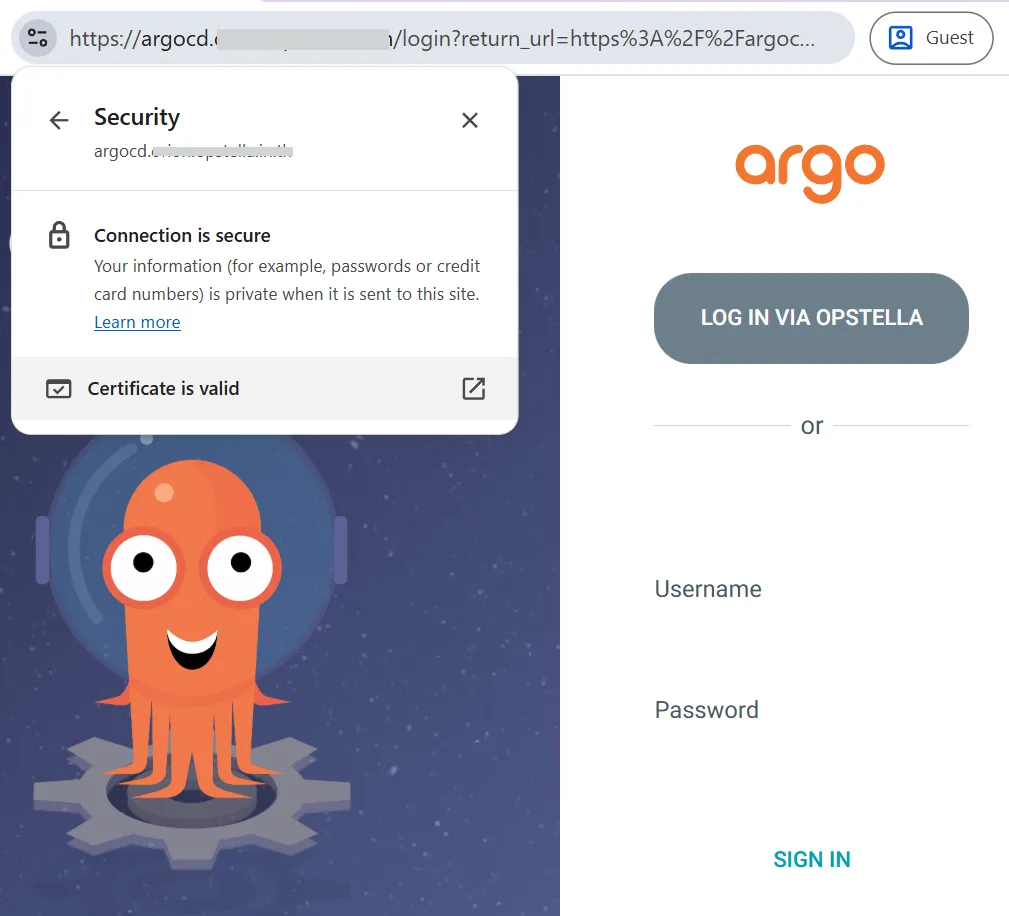
-
Login with Users
-
Try to login with Initial Admin Account, if success then it works.
-
You will be testing Single Sign-On Integration in End-to-End Testing/Single Sign-On for ArgoCD
-
-
Verify the OIDC Configuration was rendered
A malformed
oidc.configdoes not stop ArgoCD from starting — theLOG IN VIA OPSTELLAbutton silently disappears instead. Confirm the block scalar survivedenvsubst:Terminal window kubectl get configmap argocd-cm \--namespace devsecops-system \-o jsonpath='{.data.oidc\.config}'; echoissuer,clientIDandclientSecretmust all be non-empty. -
(Optional) Verify from inside the cluster
If the ArgoCD hostname is not reachable from your workstation yet (DNS or load balancer not in place), verify through the Ingress from inside the cluster instead.
Terminal window kubectl get svc --namespace ingress-nginx \-o jsonpath='{.items[?(@.spec.type=="ClusterIP")].spec.clusterIP}'; echo# argocd-probe.yaml — passes Pod Security Admission level `restricted`apiVersion: v1kind: Podmetadata:name: argocd-probespec:restartPolicy: NeversecurityContext:runAsNonRoot: truerunAsUser: 65532seccompProfile:type: RuntimeDefaultcontainers:- name: curlimage: curlimages/curl:8.10.1securityContext:allowPrivilegeEscalation: falsecapabilities:drop: ["ALL"]command: ["sh", "-c"]args:- curl -sk -o /dev/null -w "argocd https=%{http_code}\n"--resolve $ARGOCD_DOMAIN:443:$INGRESS_CLUSTER_IPhttps://$ARGOCD_DOMAIN/Terminal window kubectl apply -f argocd-probe.yaml --namespace devsecops-systemkubectl logs argocd-probe --namespace devsecops-systemkubectl delete pod argocd-probe --namespace devsecops-system💡 Should print
argocd https=200.
Finished?
Use the below navigation to proceed